| Posted: 2012 18 April at 2:58pm | IP Logged
|

|
|
The problem of not being able to close the Evermore window might be caused by the dynamic link library file, hyperlink.dll, not being updated in time. There are three specific ways to solve the problem:
ˇń Restart the computer, replace the hyperlink.dll in C:\WINNT\system32\ with the one in ˇ°Installationˇ± folder, to close Evermore normally.
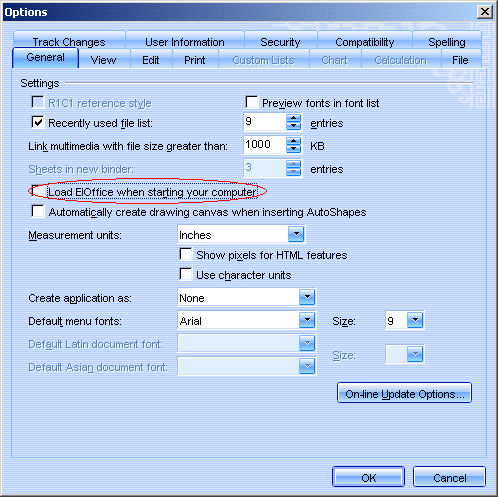
ˇń Restart the computer, open Evermore and create a new document. Select ˇ°Tool ¨C Options ¨C Editˇ±, uncheck the ˇ°Autorun Quick Startˇ± checkbox as seen in the diagram below. Restart and try again.
ˇń Restart the computer and open Evermore. Do a right mouse click on the ˇ°Evermore Office Quick Startˇ± icon  on the right of the taskbar. Uncheck the ˇ°Autorun Quick Startˇ± from the right key menu as per diagram below. Restart and try again. on the right of the taskbar. Uncheck the ˇ°Autorun Quick Startˇ± from the right key menu as per diagram below. Restart and try again.
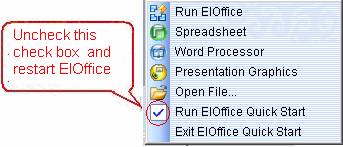
click here to uncheck, restart Evermore.
|

 Active Topics
  Memberlist
  Search
  Help
Help Register
  Login
Login Cassc Forums : Technique
 Topic: Evermore cannot be closed


